The best apps to split expenses with friends in 2026, compared
Seven expense splitting apps compared on what the free version includes, ads, currencies and export, with who each one suits and one honest caveat each.
Say six friends are spending a week in Lisbon, and two of them are going on to Morocco afterwards. They’ll want euros and dirhams in the same group. I built split-cash, and it keeps one currency per group, so for that trip I wouldn’t recommend it.
That’s how I’d think about every app on this list. They all split costs and tell you who owes whom. They differ in what the free version gives you, whether there are ads, how they handle currencies, and whether your friends need to install anything.
Since one of these is mine, I’m not neutral. I’ve stuck to what each company says on its own website or App Store listing, and marked anything I couldn’t check as not confirmed.
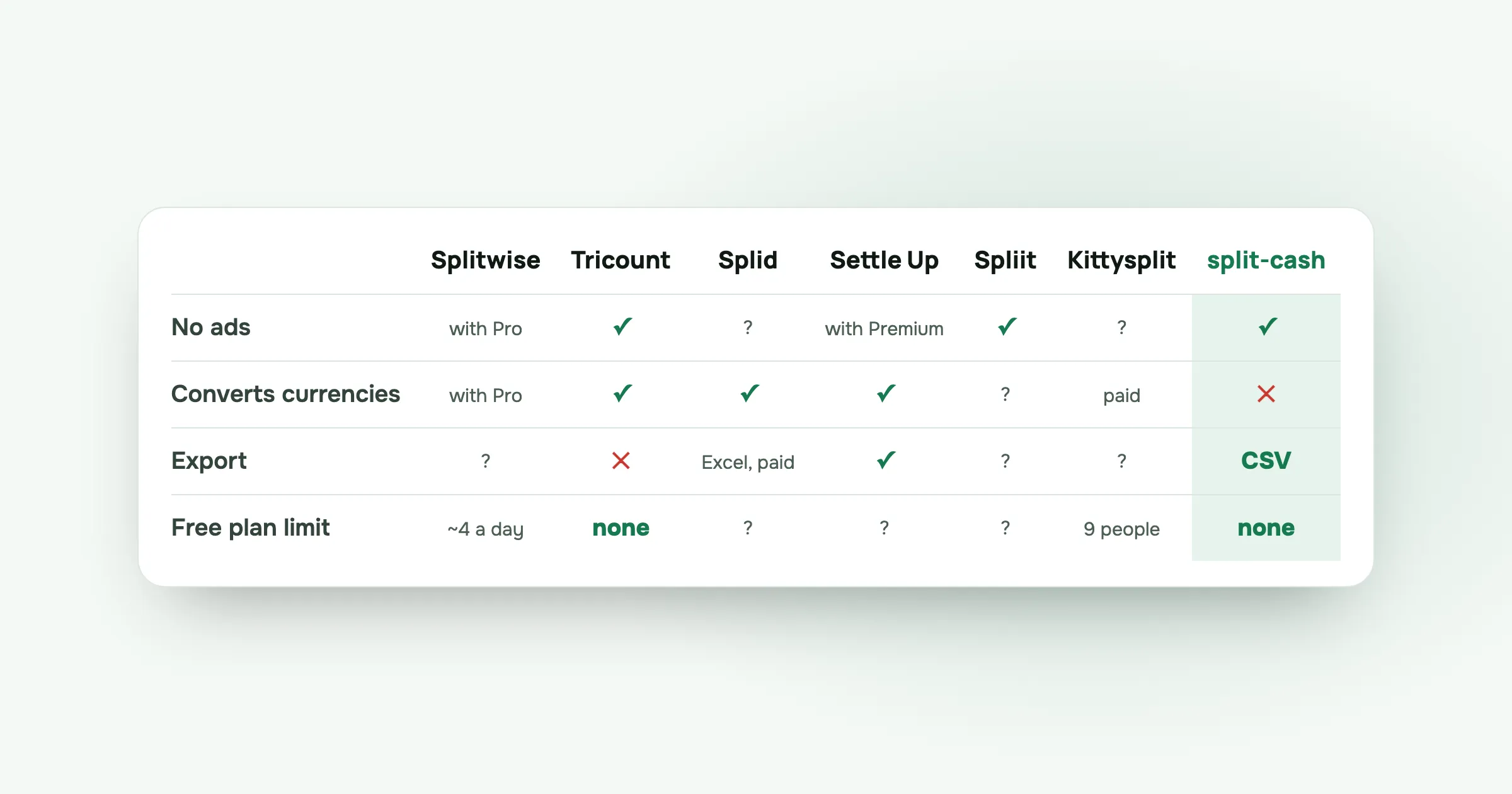
The quick comparison
| Free version | Ads | Currency conversion | Export | Paid option | |
|---|---|---|---|---|---|
| Splitwise | Daily expense limit | Yes, Pro removes | With Pro | Not confirmed | Pro, 2.99 to 39.99 (US) |
| Tricount | “No limits” | No | Yes | Removed from app | None |
| Splid | Free, with purchases | Not confirmed | Yes, 150+ currencies | PDF, Excel via purchase | Plus 3.99, 2 Groups 2.99 |
| Settle Up | Not confirmed | Yes, Premium removes | Yes | CSV and Excel | 3.99 a month or 19.99 a year |
| Spliit | Free | No | Not confirmed | Not confirmed | Not confirmed |
| Kittysplit | Up to 9 people, one currency | Not confirmed | With Super Kitty | Not confirmed | 2.99 euros per group |
| split-cash | No limits | No | No, one currency per group | CSV | None |
Prices in dollars unless marked. “Not confirmed” means I couldn’t find it on the company’s own pages or listing.
Splitwise
Who it suits: groups that already use it, and people who share costs regularly and are happy to pay for Pro.
The free version: groups, uneven splits and Simplify Debts, with a daily limit on how many expenses you can add, and ads. Splitwise doesn’t publish the exact limit; users report around four a day. Pro removes the limit and the ads, and adds currency conversion and receipt scanning. In the US App Store, Pro plans are listed from 2.99 to 39.99 dollars, depending on the plan and the country.
Caveat: the daily limit. At home you’ll rarely notice it. On a trip, you can reach it before lunch. More in Splitwise daily limit.
Tricount
Who it suits: trips across currencies, with nothing to pay and no ads.
The free version: its website says “Free. No ads. No limits.”, with currency conversion included, iOS and Android apps, offline use and import from Splitwise. The bank bunq bought it in 2022.
Caveat: when its Premium plan ended, CSV and PDF export were removed from the app, according to Tricount’s help centre. If you keep records in a spreadsheet, that matters. I compared it with Splitwise in Splitwise vs Tricount, and covered the export change in Tricount alternative.
Splid
Who it suits: iPhone groups who travel across currencies and often add costs without a signal.
The free version: according to its App Store listing, Splid is free with in-app purchases, from developer Nicolas Jersch. The listing mentions 150+ currencies with automatic conversion, offline groups, and PDF or Excel summaries. Splid Plus is 3.99 dollars and 2 Groups is 2.99 dollars.
Caveat: Excel export is an in-app purchase. I couldn’t confirm from the listing whether it shows ads, what the Android version offers, or whether there’s a web version.
Settle Up
Who it suits: groups that want native apps, several currencies and the option to work offline, and don’t mind ads or paying to remove them.
The free version: according to its App Store listing, Settle Up from Step Up Labs is free with in-app purchases. The listing includes multi-currency with exchange rates, offline use, group links that open in a browser, receipt photos, CSV and Excel export, and apps for iPhone, iPad and Mac.
Caveat: the listing says the app contains ads, which Premium removes. Premium is 3.99 dollars a month or 19.99 dollars a year, with group premium options. The listing doesn’t say which features are free.
Spliit
Who it suits: people who want something free, ad-free and open source, and friends who won’t make an account.
The free version: its website says it’s free, with no ads and no account needed. It’s open source, runs as a web app, and there’s an iPhone app. Receipt scanning is in beta.
Caveat: I couldn’t confirm from its website how it handles currencies or whether it exports your data. Check both if they matter to your group.
Kittysplit
Who it suits: one-off events with a small group where nobody wants to sign up for anything.
The free version: its pricing page says the free plan needs no sign-up and splits equally, by shares, by percent or by fixed amounts, for up to 9 people and a single currency.
Caveat: bigger groups and several currencies need Super Kitty, at 2.99 euros once per group. That covers up to 100 people, multiple currencies with conversion, and receipt attachments. Fair for a one-off, but it adds up if you make a group for every weekend.
split-cash
Who it suits: groups that mostly spend in one currency, want no ads and nothing to pay for, and have at least one friend who won’t install an app.
The free version: everything. There’s no paid plan and no limits. Hosting costs about five dollars a month and I pay it. Friends join from an invite link in the browser, and you can add them by name before they sign up. You can split equally, by exact amounts, by percent or by shares, with decimals. Settle up shows the fewest transfers, and you can mark payments as paid, including partial ones. There’s How to pay me for your payment details, a Remind button that opens your phone’s share menu, receipt photos, CSV export, archived groups and six languages.
Caveat: one currency per group, with no conversion. It also needs a connection to add costs. When you’re offline it shows the latest data you loaded, but that’s all. There’s no receipt scanning, no bank connection, and no app-store app.
How to choose
Answer these in order and you’ll usually end up with one or two options:
- Does your group already use one, and does it work? Then keep it.
- Do you need several currencies in one group? Tricount, Splid, Settle Up, Kittysplit with Super Kitty, or Splitwise with Pro.
- Will someone refuse to install an app? Look at split-cash, Spliit, Kittysplit, or Settle Up’s browser group links.
- Will you add costs with no signal? Tricount, Splid and Settle Up list offline use.
- Do you want to export to a spreadsheet? Settle Up and split-cash list CSV export. Splid offers Excel via an in-app purchase.
- Do you want no ads and nothing to buy? Tricount, Spliit or split-cash.
For the Lisbon and Morocco trip, the answer to question 2 is yes, so I’d suggest Tricount. For a weekend away in one country with a friend who won’t install anything, I’d suggest split-cash.
Questions people ask
What is the best free bill splitting app for trips? It depends on the trip. For several currencies in one group, Tricount says it’s free with currency conversion. For one currency and friends who won’t install anything, split-cash and Spliit run in the browser with no ads.
Is Splitwise still free? Splitwise has a free plan, with a daily limit on how many expenses you can add and ads. Splitwise Pro removes both. In the US App Store, Pro plans are listed from 2.99 to 39.99 dollars, depending on the plan and the country.
Which expense splitting apps have no ads? Tricount, Spliit and split-cash say they have no ads. Splitwise’s free plan and Settle Up show ads, and their paid plans remove them. For Splid and Kittysplit, I couldn’t confirm either way.
Which expense app works without installing anything? split-cash and Spliit run in the browser. Settle Up’s group links open in a browser. Kittysplit’s free plan needs no sign-up. Tricount lists iOS and Android apps, and I couldn’t confirm a web version of Splid.
If split-cash fits your group, make a group and send the link to your friends. It’s free, with no ads.
 Sabir Shaykhlislamov Built split-cash