Splitwise vs Tricount: which to use for your group, and a free third option
An honest Splitwise vs Tricount comparison for 2026: limits, ads, currencies, export and owners, plus a quick way to choose and a free third option.
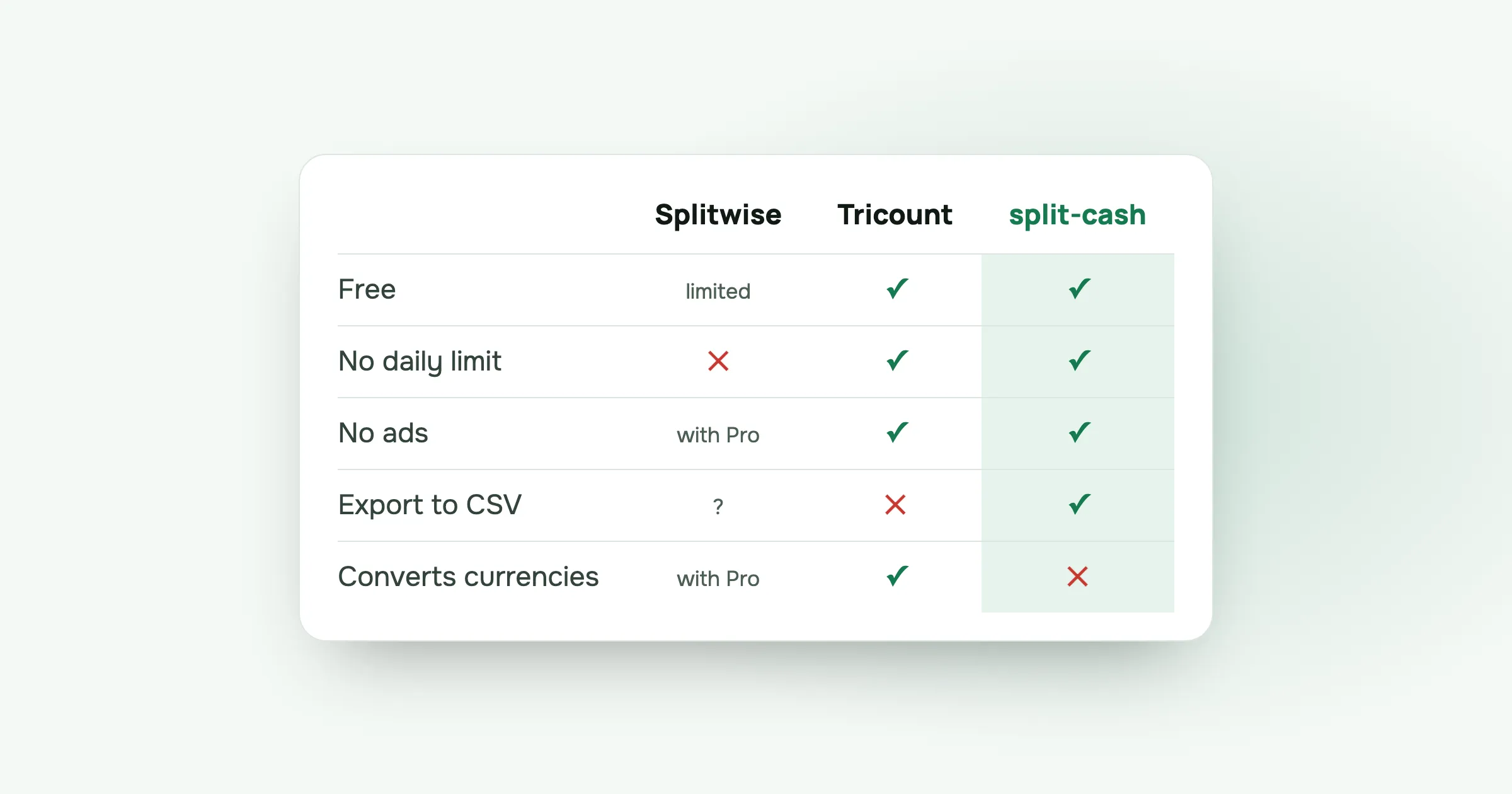
Ask a group of friends which app to use for splitting trip costs and you’ll usually get two answers: Splitwise or Tricount. Both work. They differ in what the free version lets you do, and in who’s behind them.
Here’s an honest comparison, and a simple way to choose.
The short version
- Splitwise has the most features, but the free plan limits how many expenses you can add per day and shows ads. Pro removes both.
- Tricount is free with no ads and no daily limit, handles several currencies, and is owned by the bank bunq. CSV and PDF export were removed when its Premium plan ended.
- split-cash, which I built, is free with no ads, no limits and CSV export, and keeps one currency per group.
Side by side
| Splitwise (free) | Tricount | split-cash | |
|---|---|---|---|
| Price | Free, Pro from 2.99 | Free | Free |
| Daily expense limit | Yes, about 4 | No | No |
| Ads | Yes, Pro removes them | No | No |
| Converts between currencies | With Pro | Yes | No, one currency per group |
| Export to CSV in the app | Not confirmed | Removed | Yes |
| Uneven splits | Yes | Yes | Yes |
| Settle up in few transfers | Yes | Yes | Yes |
| Install | App stores and web | App stores | Browser, add to home screen |
“Not confirmed” means I couldn’t check it on the company’s own pages.
Splitwise
Splitwise is the best-known app for shared expenses. It has groups, uneven splits, settle-up suggestions and a web version.
The free plan has two catches:
- A daily limit. Splitwise’s help centre confirms a daily cap on expenses for free users. Users report around four a day. On a trip, you hit that by lunch. More in Splitwise daily limit.
- Ads. Splitwise Pro lists an ad-free experience as one of its features.
Splitwise Pro adds unlimited expenses, receipt scanning and itemising, currency conversion at current rates, search and charts. In the US App Store, Pro plans are listed from 2.99 to 39.99 dollars, depending on the plan and the country.
Pick Splitwise if your group already uses it, someone is happy to pay for Pro, or you need receipt scanning and automatic currency conversion.
Tricount
Tricount started in Belgium and is popular across Europe. The Dutch bank bunq bought it in 2022.
Tricount describes itself as free, with no ads and no limits, which makes it a natural fit for trips. Friends can join a group from a link, and it handles several currencies in one group.
When Tricount discontinued its Premium plan, some features went with it. Tricount’s help centre lists CSV and PDF export, personal mode, statistics and saving custom splits as no longer available, with statistics and custom splits planned to return. If you want an export of your data, you have to ask support.
Pick Tricount if you travel across currencies a lot and don’t need exports.
split-cash
I built split-cash after running into Splitwise’s limit on a trip. It’s free, with no ads, no paid plan and no limits. Hosting costs about five dollars a month and I pay it, so there’s nothing to sell.
- Four ways to split: equally, by exact amounts, by percent or by shares.
- Settle up with the fewest transfers, and mark payments as paid, including partial payments.
- Add how people should pay you, and send a reminder through your phone’s share menu.
- CSV export of every group.
- Receipt photos, six languages, and friends can be added by name before they sign up.
- It runs in the browser and can be added to your home screen. There’s no app-store download.
What it doesn’t do: several currencies in one group, receipt scanning, or any bank connection.
Pick split-cash if you want something free with no ads or limits, your trip is mostly in one currency, and you’d like to be able to export your data.
How to decide in one minute
- Does the group already use one? Then use that one unless it’s getting in the way.
- Do you need several currencies in one group? Tricount, or Splitwise with Pro.
- Do you add lots of small costs on trips? Avoid the Splitwise free plan’s daily limit.
- Do you want to export to a spreadsheet? split-cash exports every group to CSV. Tricount no longer exports from the app.
- Do you want no ads and no paid plan at all? split-cash.
Questions people ask
Is Tricount better than Splitwise? For trips with friends on the free plans, Tricount is often easier because it has no daily expense limit. Splitwise has more features if you pay for Pro, such as receipt scanning and currency conversion.
Is Splitwise free? Splitwise has a free plan with a daily limit on how many expenses you can add, and ads. Splitwise Pro removes both. In the US App Store, Pro plans are listed from 2.99 to 39.99 dollars, depending on the plan and the country.
Is Tricount free? Yes. Tricount is free. Its old Premium plan was discontinued, and some Premium features, including CSV and PDF export, were removed rather than made free.
Which expense app is best for travel? One that the whole group will use, with no daily limit and an easy way to settle up at the end. If you need many currencies in one group, Tricount or Splitwise Pro handle that. If one currency per trip is enough, split-cash is free with no ads.
Want to try the third option? Make a group in split-cash in a minute. It’s free, with no ads.
 Sabir Shaykhlislamov Built split-cash