Splitwise daily limit: what it is and what to do when you hit it
How the Splitwise free plan's daily expense limit works, why it hits hardest on trips, the workarounds, and free options with no limit.
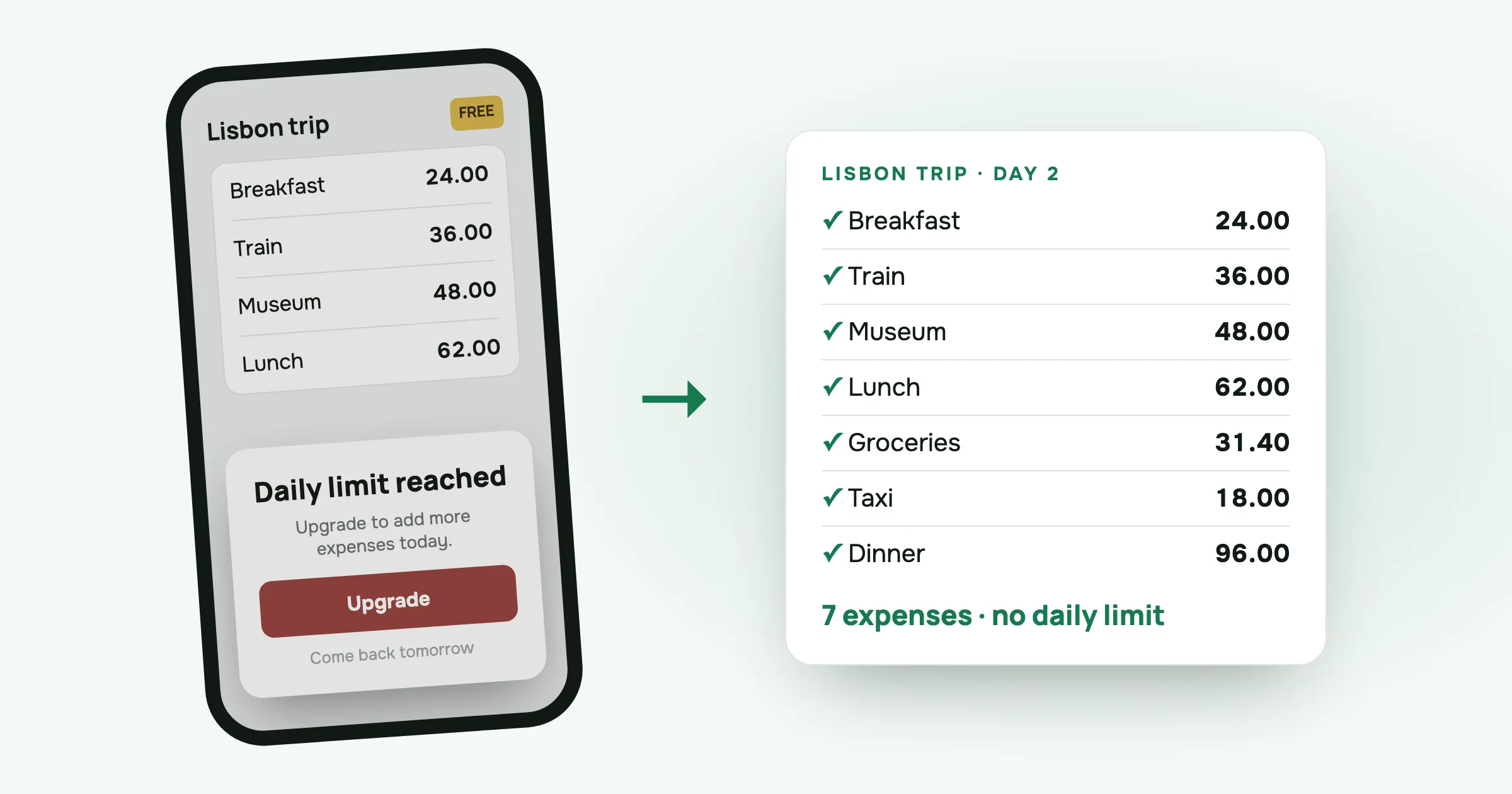
You’re on the second day of a trip. Breakfast, train tickets, museum, lunch. You open Splitwise to add the taxi and get a screen saying you’ve reached today’s limit, with an offer of Splitwise Pro.
This is the Splitwise daily limit, and if you share costs on trips, you’ll hit it sooner or later. Here’s how it works and what you can do about it.
What the limit is
Splitwise’s free plan caps how many expenses you can add per day. Splitwise’s help centre confirms the limit but doesn’t give the number. Users mostly report four expenses a day, and some report three or five.
A few details matter in practice:
- It counts the expenses you add. If you’re the one recording everything for the group, you’re the one who runs out.
- It resets the next day. You can add more once the daily limit resets.
- Your friends have their own allowance. A friend on the free plan can still add expenses after you’ve hit yours.
- Splitwise Pro removes it. In the US App Store, Splitwise Pro plans are listed from 2.99 to 39.99 dollars, depending on the plan and the country.
Splitwise says the limit is part of how it keeps a free plan without selling data. That’s a fair business decision. It also means the free plan stops working at the moment you need it most.
Why it hurts most on trips
At home, four expenses a day is plenty. A dinner out now and then, a shared gift, the odd taxi.
A trip is different. A normal day away with friends looks something like this:
- Coffee and breakfast
- Metro or train tickets
- Museum or activity
- Lunch
- Groceries for the flat
- Taxi back
- Dinner
That’s seven expenses before anyone orders a drink. The limit lands in the afternoon, and the costs you can’t record are the small ones that go missing later.
What you can do today
Ask a friend to add it. This is what Splitwise suggests. Your friend adds the expense and sets it as paid by you. It works, but it means messaging someone each time, and their allowance runs out too.
Combine expenses. Add “Day 2: lunch, taxi, museum” as one expense. You stay under the limit but lose the detail. If someone skipped the museum, you can’t leave them out of that part any more.
Write it down and add it tomorrow. A notes app or the back of a receipt. Fine for a quiet day, unreliable on a busy one. Costs written down “for later” are the ones that never get added.
Pay for Pro. If the whole group already lives in Splitwise and you add most of the costs, Pro might be worth it to you.
Use an app without a limit. For a new trip, this is the simplest fix.
Free options with no daily limit
- split-cash is the app I built after running into this limit myself. It’s free, with no ads, no paid plan and no limit on expenses or groups. It runs in the browser and can be added to your home screen, so friends don’t have to install anything from an app store. Each group has one currency.
- Tricount is free and popular in Europe. It’s owned by the bank bunq. When its Premium plan was discontinued, CSV and PDF export were removed from the app.
- A shared spreadsheet has no limits, but you do the settle-up maths yourself.
I wrote a longer comparison in a free Splitwise alternative, including how to move a group across.
Switching mid-trip
You don’t need to move old groups. The cleanest way:
- Leave the existing Splitwise group as it is, and add whatever is still missing there over the next few days.
- Record the rest of the trip in the new app. In split-cash, make a group, send the invite link to the group chat, and everyone can add costs from their own phone.
- At the end, settle each app separately. Two short settle-ups are easier than one argument about missing costs.
For the next trip, start in the new app on day one.
Questions people ask
How many expenses can you add per day on free Splitwise? Splitwise doesn’t publish the exact number. Its help centre only says there is a daily limit on the free plan. Most users report around four expenses a day before the upgrade prompt appears.
How do you get around the Splitwise daily limit? Splitwise suggests two things. Wait until the limit resets the next day, or ask a friend to add the expense for you and mark it as paid by you. Otherwise you need Splitwise Pro, or an app without a limit.
How much is Splitwise Pro? In the US App Store, Splitwise Pro plans are listed from 2.99 to 39.99 dollars, depending on the plan and the country.
Is there a free Splitwise alternative with no daily limit? Yes. split-cash is free, with no ads and no limit on expenses or groups. Tricount is also free to use.
Hit the limit today? Start a group in split-cash and add the rest of the trip there.
 Sabir Shaykhlislamov Built split-cash