Splitwise simplify debts not working? Why it asks you to pay a stranger
Why Splitwise's Simplify Debts tells you to pay someone you never shared a cost with, why it sometimes changes nothing, and how to check the maths.
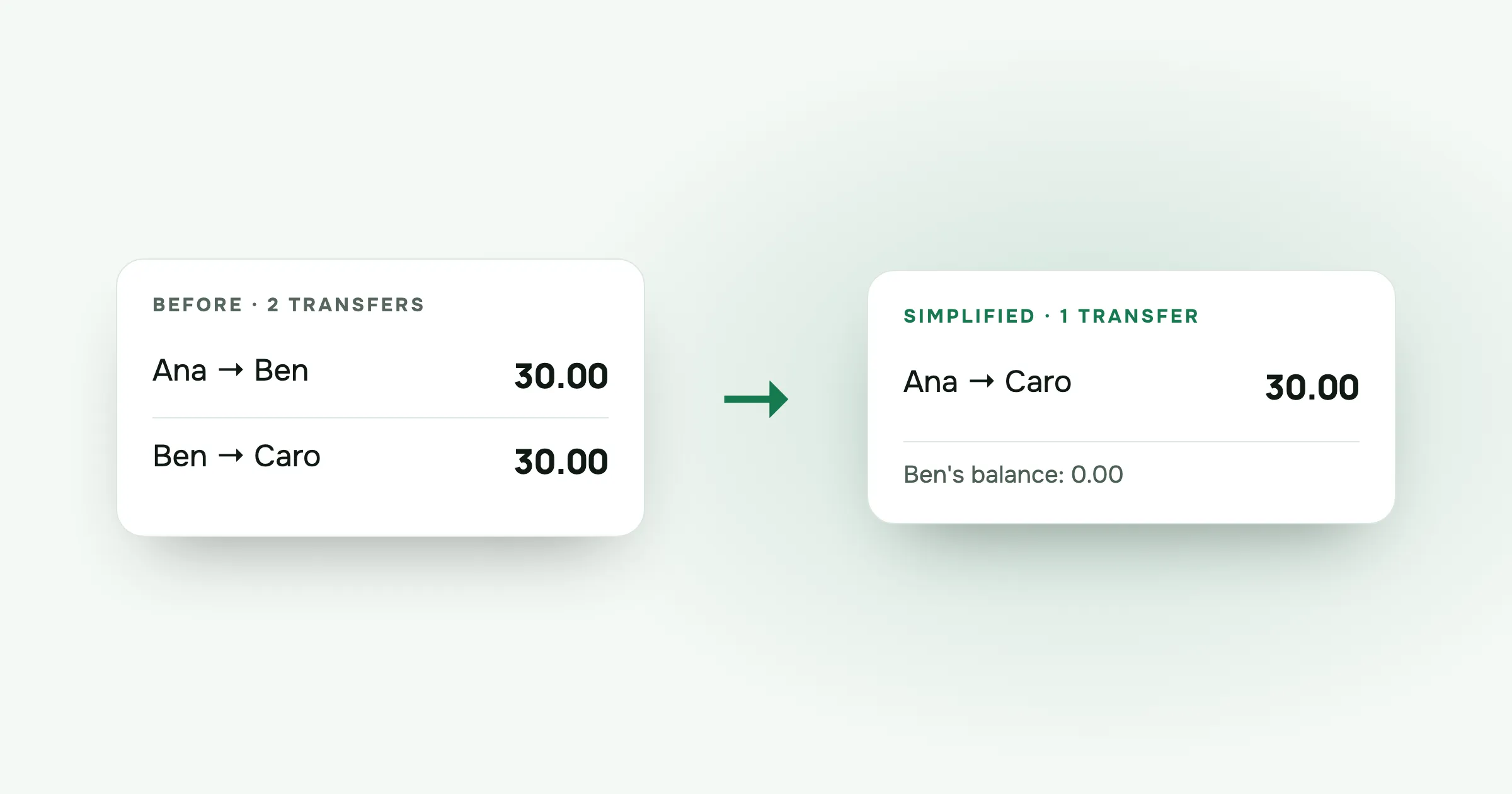
Ana gets a notification after a weekend away: she owes Caro 30.00. She never had a meal with Caro, never shared a taxi with her, and doesn’t remember Caro paying for anything she used. Her first thought is that the app has made a mistake.
It almost certainly hasn’t. Splitwise’s Simplify Debts is doing exactly what it’s designed to do. The result just looks wrong if you don’t know how it works. Here’s what’s going on, with a three-person example you can check with a calculator, and the reasons it sometimes appears to do nothing at all.
What Simplify Debts does
Splitwise’s help page describes the feature in plain terms. It looks at what everyone in a group owes and is owed, and suggests a shorter set of payments that settles the same amounts. Three details from that page matter for troubleshooting:
- It never changes anyone’s total balance. If you owe the group 30.00 overall, you still owe 30.00. Only the person you pay changes.
- It works per currency. It doesn’t convert between currencies, so a group with costs in euros and pounds gets simplified twice, separately.
- If the debts are already as simple as possible, it changes nothing.
Any member of the group can turn it on or off, which is useful to know when the payments you see suddenly look different from yesterday’s.
Why you owe someone you never spent with
Take three friends on a short trip: Ana, Ben and Caro.
| Expense | Paid by | Split between | Amount |
|---|---|---|---|
| Dinner on Friday | Ben | Ana and Ben | 60.00 |
| Taxi to the airport | Caro | Ben and Caro | 60.00 |
Ana and Caro never shared anything. Ana ate with Ben. Ben rode with Caro.
Without simplification, the debts follow the expenses:
- Ana owes Ben 30.00 for her half of dinner.
- Ben owes Caro 30.00 for his half of the taxi.
Now look at each person’s balance, which is what they paid minus their share of everything:
- Ana paid 0.00, her share is 30.00, balance −30.00
- Ben paid 60.00, his share is 30.00 + 30.00 = 60.00, balance 0.00
- Caro paid 60.00, her share is 30.00, balance +30.00
Ben is even. He’s owed 30.00 by Ana and owes 30.00 to Caro. If Ana pays Ben and Ben passes it on to Caro, the same 30.00 just moves through his account on its way somewhere else.
So simplification cuts Ben out: Ana pays Caro 30.00. One transfer instead of two. Ana pays the same amount she always owed. Caro receives the same amount she was always owed. Ben does nothing, which is correct, because his balance was zero.
That’s the whole reason you get told to pay a stranger. Your money was always going to end up with them. The app just skips the middle step.
In a bigger group the chains get longer and harder to follow by eye, but the logic is the same. If you want the method step by step, with a four-person example, I wrote it up in How to settle group debts with the fewest payments.
Why it sometimes changes nothing
The other common complaint runs the opposite way: you turn Simplify Debts on and the list of payments looks exactly the same. A few reasons, all from how the feature is described:
The debts are already as simple as they get. Change the example. Ben pays for a 60.00 dinner for Ana and himself, and a 40.00 taxi for Caro and himself.
- Ana owes Ben 30.00.
- Caro owes Ben 20.00.
Ben is owed 50.00 and the other two each owe him directly. There’s no chain to cut. Two people owe money, so two transfers is the minimum. Splitwise’s help page says that in this case it makes no changes, and that’s the right answer.
The costs are in different currencies. Simplification works per currency and doesn’t convert. If Ana owes Ben 30.00 euros and Ben owes Caro 30.00 pounds, there’s nothing to cancel out, because those are two separate pots. You’ll see both debts.
Someone turned it off. Any group member can switch it. If your list changed overnight, check the group settings before assuming a bug.
Payments were already made. Splitwise’s help page notes that turning simplification off after people have paid along the simplified paths unravels those paths. Ana’s 30.00 to Caro was a shortcut through Ben. Switch the feature off and the debts go back to following the expenses, through Ben, while Ana’s money already went to Caro. The leftover numbers can look strange, even though nobody’s total balance has changed. It’s usually easiest to leave the setting where it was when people started paying.
How to check it yourself
When a suggested payment looks wrong, don’t look at individual expenses. Look at balances.
- For each person, add up everything they paid.
- Add up their share of every expense they were part of.
- Paid minus share is their balance.
- All the balances together should add up to zero.
If your own balance matches the total you’re being asked to pay, the suggestion is fine, whoever it says to pay. If it doesn’t match, the problem is in an expense: a wrong amount, the wrong payer, or someone included in a split they weren’t part of. That’s worth fixing in the expense itself, not in the settings.
Should you turn it off?
Some groups prefer to pay back the person who actually paid, for reasons that have nothing to do with maths. Maybe Ana and Caro barely know each other, or Ana would rather settle with Ben over coffee. That’s a fair choice. You’ll make more transfers, but each one makes sense on its own.
If you do switch it off, do it before anyone starts paying, so nothing unravels halfway through.
How split-cash handles this
I built split-cash, and it takes the same approach without the switch. It nets everyone’s balances and always settles in the fewest transfers. There’s no toggle, so the plan can’t change because someone flipped a setting. Each person’s balance stays exactly what their expenses say it is. In the example above, Ana would see one line: pay Caro 30.00.
It keeps one currency per group, so the per-currency question doesn’t come up, but it also means it won’t convert between currencies for you. On the Settle up screen you can mark each transfer as paid, including partial payments, and the plan updates around what’s been paid. It’s free, with no ads and no limits.
Questions people ask
How does Splitwise simplify debts? It adds up what each person in the group owes and is owed, then suggests fewer payments that settle the same totals. According to Splitwise’s help page, nobody’s total balance changes. Only who pays whom does.
Why do I owe someone I never spent with? Because simplification passes debts through. If you owe Ben 30.00 and Ben owes Caro 30.00, paying Caro directly settles both in one transfer. You still pay exactly what you owed.
Why does Simplify Debts change nothing in my group? Splitwise’s help page says that if the debts are already as simple as possible, it makes no changes. It also works per currency and doesn’t convert between them, so costs in two currencies stay separate.
Can I turn off Simplify Debts in Splitwise? Yes. According to Splitwise’s help page, any group member can turn it on or off. If payments were already made along the simplified paths, turning it off unravels them, so the remaining debts can look odd for a while.
Want a settle-up plan with no setting to argue about? Make a group in split-cash, add the costs and open Settle up. It’s free, with no ads.
 Sabir Shaykhlislamov Built split-cash