An expense splitting app with no download: why split-cash runs in the browser
How a browser-based expense app works with an invite link in the group chat, how to add it to your home screen, and what a web app does less well.
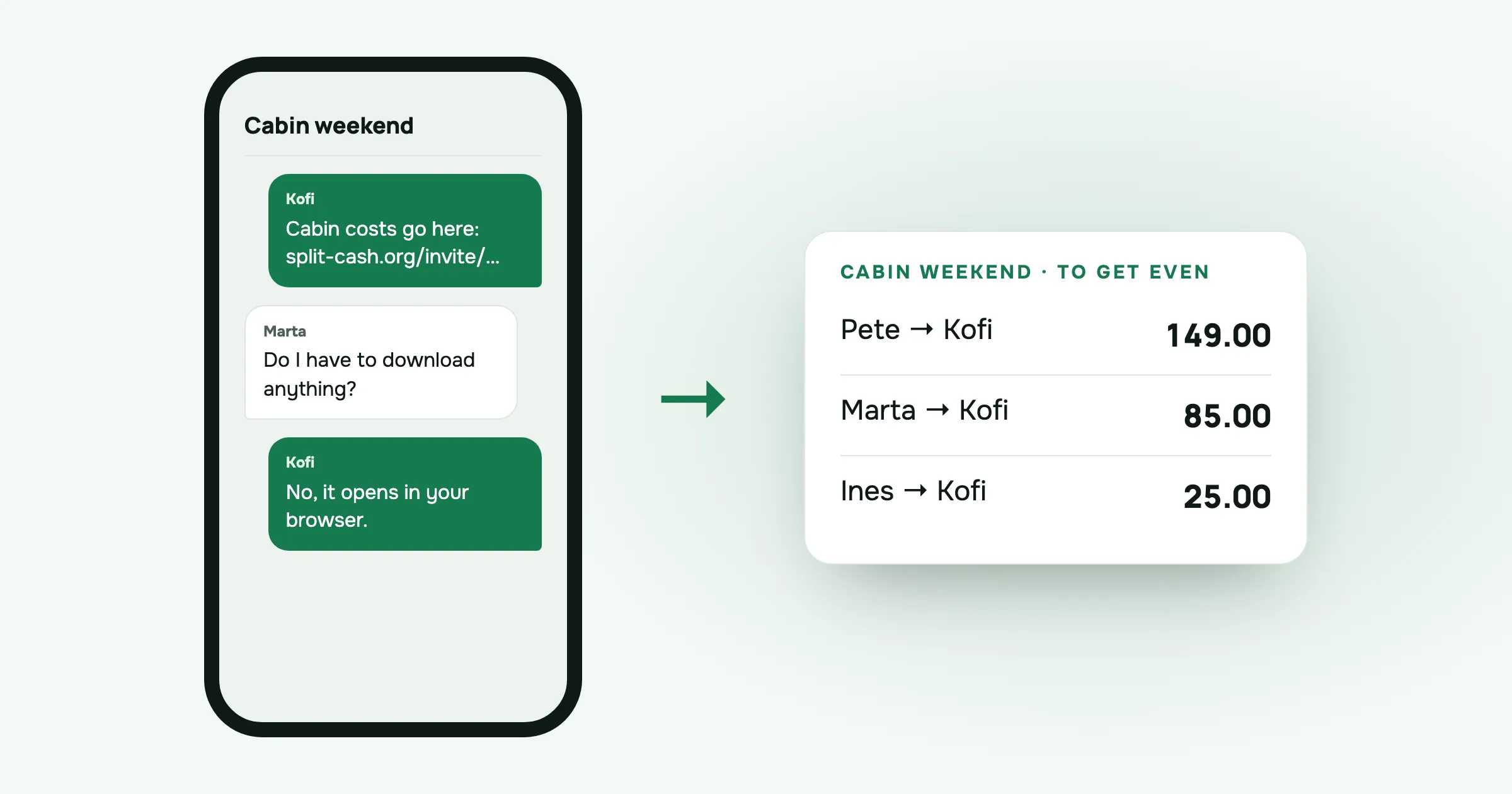
The trip is booked. Kofi posts a link in the group chat: “Let’s track costs in this, download it before Friday.” Ines installs it straight away. Pete says he’ll do it later, which means he won’t. Marta replies with one line: “I’m not downloading an app for one weekend.”
She has her reasons. Her phone is full of photos and the storage warning has been on for months. She doesn’t remember her app store password. She has four other apps from four other trips that she opened once.
By Sunday, Kofi is entering Marta’s costs for her from screenshots of her banking app.
I’m Sabir, and I build split-cash on my own. That scene is the main reason it runs in the browser.
Why one friend can break a group app
Most expense apps ask everyone to install them. For a group, that’s a chain with as many links as there are people. If one person doesn’t install it, they can’t add what they paid or see what they owe. Someone else ends up typing their costs in and relaying the balances back.
At that point the app is helping the person who installed it, and nobody else. Groups notice, and the next trip goes back to a spreadsheet, or to memory.
A web app removes that step. Everyone already has a browser.
How it works with a link
Here’s what joining split-cash looks like for a friend who has never heard of it:
- Someone makes a group and taps to share the invite link. They paste it into the group chat.
- Each friend taps the link. It opens in the browser they already use and shows who invited them and to which group.
- They create a free account on that page and pick their name in the group.
- They see every expense so far, and can add their own from then on.
There’s nothing to find in a store, no download over hotel Wi-Fi and no storage warning.
You don’t have to wait for everyone to join, either. When you make the group, add friends by name. Their costs wait under their name until they sign up and claim it. If one friend never opens the link at all, they’re still in the split, and someone else can add what they paid.
Adding it to the home screen
A browser tab is easy to lose among forty others. If you’ll use split-cash for a whole trip, put it on your home screen. It then opens from its own icon, without the browser’s address bar, like any other app.
On an iPhone:
- Open split-cash in Safari.
- Tap the Share button.
- Scroll down and tap Add to Home Screen, then Add.
On Android:
- Open split-cash in Chrome.
- Tap the menu, the three dots in the corner.
- Tap Add to Home screen or Install app, depending on your phone, and confirm.
This takes a few seconds and doesn’t go through a store. It’s optional, too. Marta can keep using the link in her browser if she prefers.
What a web app does less well
I’d rather tell you the downsides now than have you find them on a ferry.
Adding an expense needs a connection. Without signal, split-cash still shows the latest data it loaded, so you can check who owes what. But you can’t add or change an expense until you’re back online. On a mountain or a boat, photograph the receipt or note the amount, and add it later.
There are no app-store reviews. split-cash isn’t in an app store, so there’s no page of star ratings to judge it by. You’re trusting a website built by one person. I’d want to know more in your place, so I wrote down why I built it and how it’s paid for. It’s free, with no ads and no limits on groups or expenses.
Reminders go through your own apps. When someone owes you, Remind opens your phone’s share menu. You pick WhatsApp, Messages or whatever your group uses, and send the nudge yourself.
If you don’t want an account at all
For a one-off sum, you don’t need a group or an account. The free calculators run in the browser without signing up:
- Bill split calculator for a restaurant bill.
- Who owes who for a list of who paid what.
- Trip expense splitter for a short trip.
- Fuel cost calculator for a drive.
- Split by nights calculator for people staying different numbers of nights.
When people pay for things over several days, a group is easier, because everyone adds their own costs as they go.
A worked example
Kofi, Marta, Ines and Pete spend a weekend in a cabin. Kofi makes the group and adds the others by name. Marta opens the link in her browser on Friday night and never installs anything. She adds the groceries herself from the supermarket car park.
| Expense | Paid by | Amount | Each |
|---|---|---|---|
| Cabin, two nights | Kofi | 480.00 | 120.00 |
| Groceries | Marta | 136.00 | 34.00 |
| Fuel | Pete | 72.00 | 18.00 |
| Saturday dinner | Ines | 196.00 | 49.00 |
| Total | 884.00 | 221.00 |
All four costs are split equally between the four of them.
Check it: 480.00 + 136.00 + 72.00 + 196.00 = 884.00, and 4 × 221.00 = 884.00.
Balances, what each person paid minus their 221.00 share:
- Kofi: 480.00 − 221.00 = +259.00
- Marta: 136.00 − 221.00 = −85.00
- Pete: 72.00 − 221.00 = −149.00
- Ines: 196.00 − 221.00 = −25.00
They add up to zero. Settle up shows three transfers, all to Kofi: Pete sends 149.00, Marta sends 85.00 and Ines sends 25.00. That’s 259.00, exactly what he’s owed.
Kofi has filled in How to pay me, so Marta copies his bank details from the same browser tab and taps Mark as paid. Her phone storage is exactly where it was.
Questions people ask
Is there an expense splitting app that doesn’t need a download? Yes. split-cash runs in the phone’s browser, so nobody installs anything from an app store. You open a link, create a free account, and you’re in the group. You can add it to your home screen if you want it to open like an app.
Do my friends need to install anything to join the group? No. Send the invite link to the group chat. Each friend opens it in their browser, creates an account and picks their name. You can add them by name before they join, and any costs you record for them are waiting when they do.
How do I add a web app to my home screen? On an iPhone, open the site in Safari, tap Share, then Add to Home Screen. On Android, open it in Chrome, tap the menu, then Add to Home screen or Install app. The icon then opens it without the browser’s address bar, like any other app.
Does a browser expense app work offline? Partly. split-cash shows the latest data it loaded, so you can check balances without signal. Adding or changing an expense needs a connection, so note the amount or photograph the receipt and add it when you’re back online.
Got a friend who won’t install anything? Make a group in split-cash and send them the link. It’s free, with no ads.
 Sabir Shaykhlislamov Built split-cash